Software Supply Chain Security
Official npm package poisoned, AI programming tool configurations also targeted

Have you ever encountered a situation where the package name, publisher, and version number all look completely normal? The development machine executes npm install as usual, and the pipeline continues to run. It isn't until a security advisory is published that the team realizes malicious code may have already executed in the development or build environment.
On 11 July, Jscrambler disclosed that the jscrambler npm package used by its Code Integrity product was subject to an unauthorized publication, while other products were unaffected. The malicious versions included 8.14.0, 8.16.0, 8.17.0, 8.18.0, and 8.20.0. An official update on 13 July showed that npm recorded 1,479 related downloads, including dependency downloads triggered by associated packages; 8.22.0 is the secure version.
The attackers adjusted the trigger method multiple times within a few hours. Versions 8.14.0, 8.16.0, and 8.17.0 ran the malicious payload via preinstall; 8.18.0 and 8.20.0 moved the payload into the package entry point and CLI files, triggering when the package is imported or the CLI is run. If you only check installation hooks, the latter two versions might be missed.
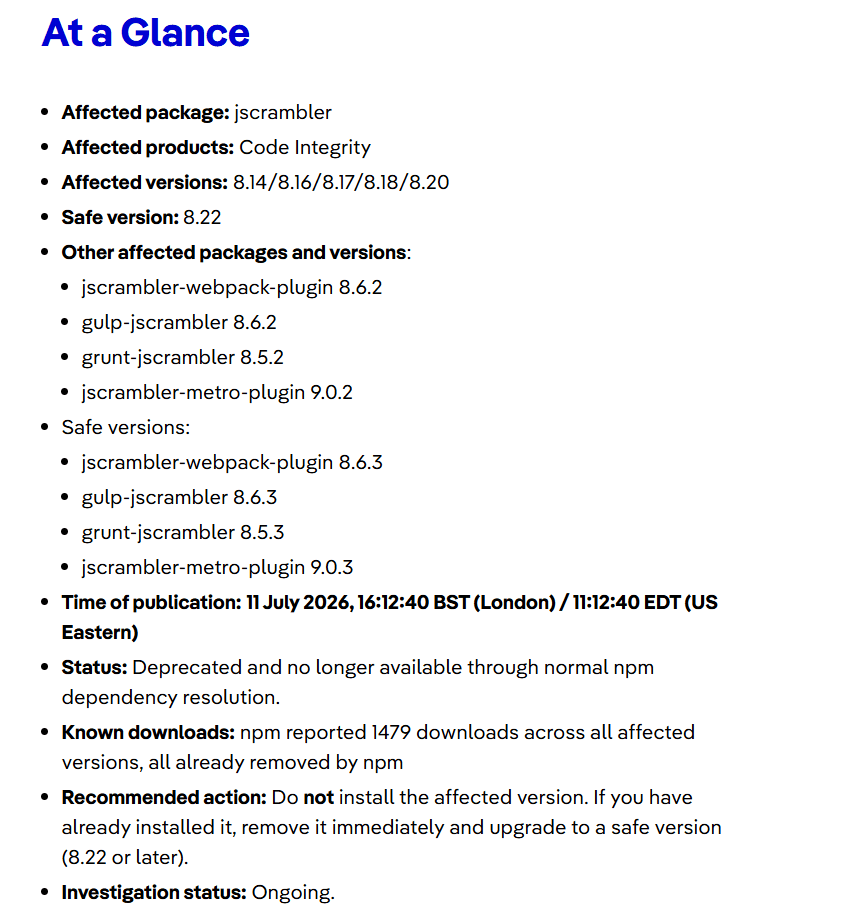
Image source: Jscrambler
01 From preinstall to Package Entry Point: The Trigger Method Has Changed
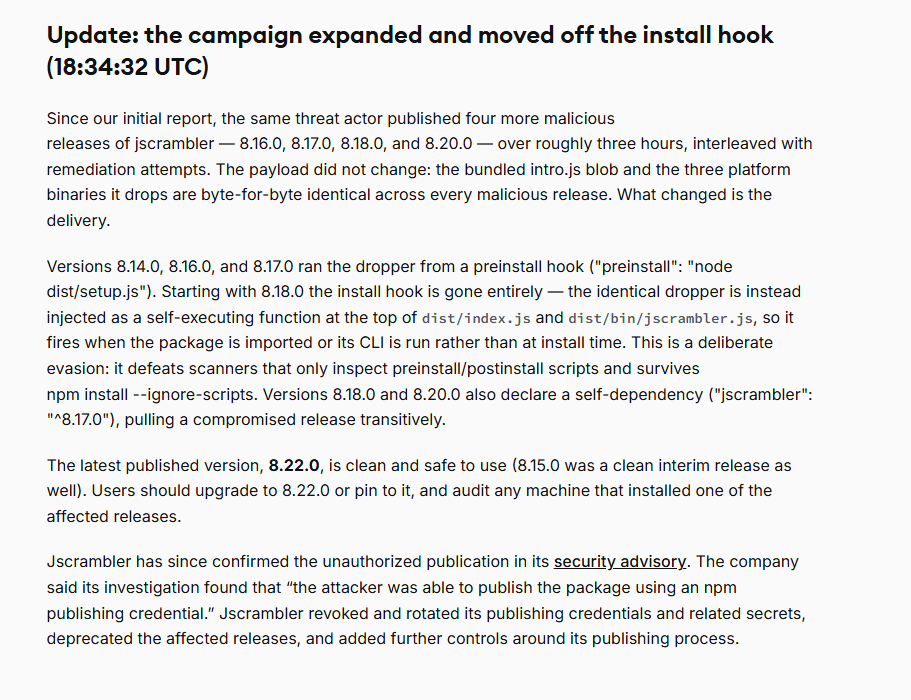
Image source: Socket Research
In npm, installation scripts have always been a source of both convenience and annoyance. Many packages rely on them for platform adaptation, compilation preparation, and dependency checks. Development colleagues don't usually scrutinize them every single time. It is all too common for a package to come from an official name, look normal in its version number, and be automatically pulled down and installed in CI.
The problem lies exactly here. preinstall runs very early, so early that many security checks haven't had a chance to intervene yet. Once it executes on a development machine, build machine, or release pipeline, it has the opportunity to see local configurations, environment variables, temporary directories, credential files, and even some tool configurations that no one usually audits deliberately.
When doing post-mortems on this type of incident, the most exhausting part for the security team is often not the vulnerability ID, but the scope of impact. Which machine installed it, which job ran it, which token was still valid at the time, and which build artifacts were subsequently used. Looking solely at the dependency manifest only shows that the package came in; to determine what it touched, you have to dig up the environment at the time of installation.
02 Asset Inventory is the Ideal, the Dev Machine Scene is the Reality
The targets mentioned in this public analysis are somewhat diverse: cloud credentials, CI tokens, browser sessions, wallets, local configurations, Bitwarden vaults, as well as configuration files for AI programming tools like Claude Desktop and Cursor. At first glance, they seem scattered, but on a development machine, they are not scattered at all.
A development environment is inherently a place of "convenience". For ease of debugging, cloud accounts might be logged in; for ease of releasing versions, CI tokens might be in environment variables; to boost efficiency, AI programming tools are also integrated into the engineering context. Everyone knows these things are sensitive, but when projects are rushing to meet deadlines, many configurations will be run first and narrowed down later.
Attackers do not need to map out an enterprise's entire business system first. As long as malicious code executes on a development machine or in a build environment, it will harvest cloud credentials, CI tokens, and AI tool configurations according to set paths, and then attempt to access the corresponding cloud accounts, pipelines, or internal services.
Incident File
Affected Object: Malicious versions of the jscrambler npm package.
Trigger Method: 8.14.0, 8.16.0, 8.17.0 triggered via preinstall; 8.18.0, 8.20.0 triggered when importing the package or running the CLI.
Scope of Impact: Development machines and CI/CD build environments, along with the credentials and configurations stored within them.
Key Investigation Points: Check which machines and build tasks the affected versions appeared in, confirm whether installation, import, or CLI was triggered, and investigate the credentials and configurations accessible at that time.
03 AI Programming Tool Configurations Have Also Become Harvesting Targets
In the past, when conducting credential audits, people easily thought of cloud accounts, Git tokens, npm tokens, SSH keys, and CI secrets. Now, AI programming tools must also be added to the list.

Image source: Socket Research
This is not to say that AI tools are inherently more dangerous. The reason is simple: to make it easier to read projects, call models, and connect contexts, they often save connection information and configuration files. Some teams even connect internal knowledge bases, code repositories, and plugin services. What is usually seen as an efficiency tool becomes, in the eyes of a poisoning script, a set of directories that can be easily rummaged through.
This is indeed a blind spot right now. Many teams guard Git keys and cloud accounts very tightly, but rarely look back at the configuration directories of AI programming tools to check whether API keys, tokens, or MCP service credentials are saved inside.
Once a poisoning script runs on a development machine, the attacker doesn't need to pry the door open from the outside; they are already rifling through the cabinets inside the house.
04 After Upgrading to the Secure Version, Affected Machines Still Need to Be Checked
When encountering this type of incident, changing the version must be done, and deleting the malicious package must also be done. But if you only stop at package.json and lockfile, it's hard to feel at peace.
During the investigation, first map out the scope of impact: which dev machines, build machines, and container images have had the affected versions; whether installation, package importing, or CLI running was executed; whether build logs align with the timeline; whether there are any anomalies in temporary directories, child processes, and network connections; whether related credentials have been rotated; and whether subsequent builds have switched to a clean environment.
None of these steps are highly sophisticated; the trouble is that the information is too scattered. If records are complete, it can be cleared up in half a day; if records are incomplete, you can only dig through CI, check caches, ask developers, and look at terminal logs, piecing it back together bit by bit. If you can piece it together, that's fine; if you can't, the risk can only be handled in a more conservative manner for the time being.
05 After Remediation is Complete, Run Key Detections Once More
Once version upgrades and credential rotations are completed, it is best to perform a targeted re-test. First, check whether anomalous package versions and malicious code execution can trigger alerts, and then check whether unfamiliar binaries in CI, anomalous outbound connections, and the use of old tokens leave traces. Detection differences between development machines and build machines also need to be cross-referenced once.
During the post-mortem, clarify several things first: who triggered the pull, on which machines the affected versions appeared, by what method they were triggered, and what credentials were accessible at that time. If the source, version, content, and subsequent destination of a software package are all recorded when it enters the development environment and pipeline, these questions become much easier to answer. The next time a similar incident occurs, the team won't have to piece the scene back together from chat histories.
References: Jscrambler Security Advisory, Unauthorized Publication of a Malicious npm Package, July 2026. BleepingComputer, Hackers backdoor Jscrambler npm package with infostealer malware, 13 July 2026. Reflectiz, Jscrambler npm Package Compromised: Why It Matters, July 2026. Socket.dev, jscrambler npm Package Compromised in Supply Chain Attack, 11 July 2026.


