Security Verification and Offensive-Defensive Practice
How to leverage the MITRE ATT&CK framework to implement a purple teaming strategy

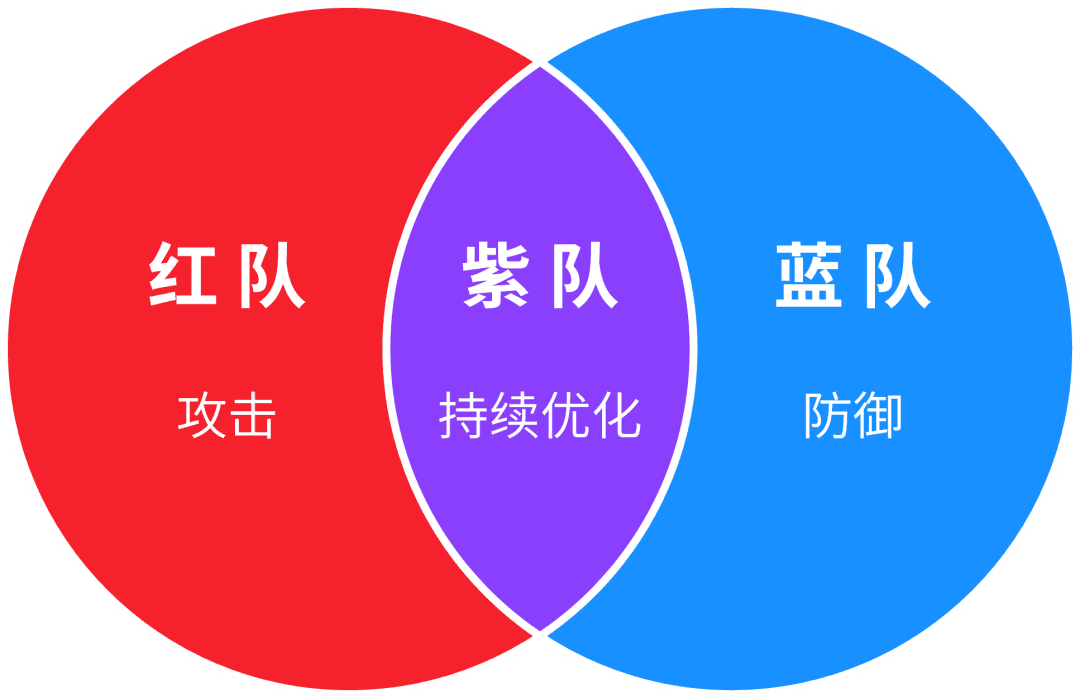
Purple Team is a mindset that integrates the perspectives of attackers and defenders. By merging the defensive strategies and tactics of the Blue Team with the Red Team's knowledge of identified cybersecurity vulnerabilities, it maximises the efficiency of both teams to continuously improve the organisation's security defensive resilience.
▼
Three Steps to Build a Purple Team Engine
Step 1—Simulation: First, the Red Team assesses the effectiveness of the organisation's defences by simulating adversary tactics, techniques, and procedures (TTPs).
Step 2—Validation: The Red Team analyses the simulation results and briefs the Blue Team on successful or unsuccessful attacks, as well as weakness in the organisation's defences discovered in this step. With the Red Team's help, the Blue Team understands the adversary's TTPs and measures security control coverage against the attacker's techniques and activities. Therefore, collaboration between both teams is crucial in this step.
Step 3—Mitigation: The Blue Team addresses the gaps identified in the previous step, including gaps in preventative measures, logging, and detection. Identified security risks are mitigated through defensive technologies, strategies, and tactics. Additionally, the Blue Team needs to provide feedback to the Red Team on their counter-actions, enabling the Red Team to enhance their attacks against the Blue Team's defences.

The following section explains how organisations can use the MITRE ATT&CK framework to build a Purple Team engine.
▌Step 1: Simulation
During this stage, the Red Team assesses the organisation's defensive effectiveness by simulating adversary TTPs, which involves two parts of operations:
A. Threat Intelligence
Regardless of the cybersecurity team's maturity level, ATT&CK can help any organisation analyse and categorise threat intelligence. The MITRE ATT&CK team divides maturity into three levels.
Level 1: Beginners without many resources Level 2: Intermediate teams starting to mature
Level 3: Advanced cybersecurity teams and resources
Level 1 Threat Intelligence————
For some small and medium-sized organisations without a dedicated threat intelligence team, security personnel can start with a single threat group targeting their industry, country, or region to look at the techniques used by the group.
Example: ATT&CK Level 1 Threat Intelligence
Taking a telecom company as an example, searching for "telecom" on the MITRE ATT&CK homepage reveals several threat groups targeting the telecommunications sector. For instance, the MuddyWater group, which targets the telecom industry.

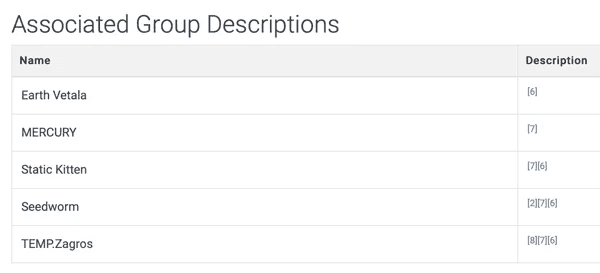
ATT&CK provides threat group attribution, targeted geographical locations, and targeted sectors. On the threat group page, ATT&CK also provides associated groups, which are the same or very similar threat groups mentioned in various threat intelligence reports. Knowing the names of associated threat groups is also crucial, as vendors have not yet reached a consensus on naming.
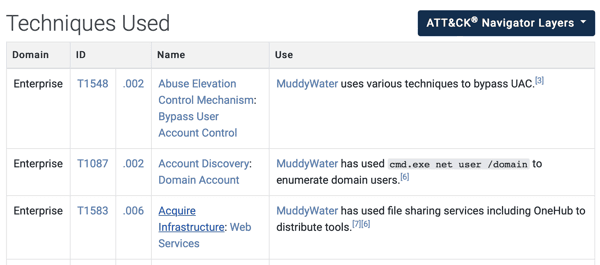
Security personnel can learn more about these groups by looking at their techniques. ATT&CK covers the techniques used by each threat group.
Additionally, ATT&CK provides visual operations in the ATT&CK Navigator. By clicking the "ATT&CK Navigation Layers" button on the group page, the blue parts represent the techniques used by that threat group.
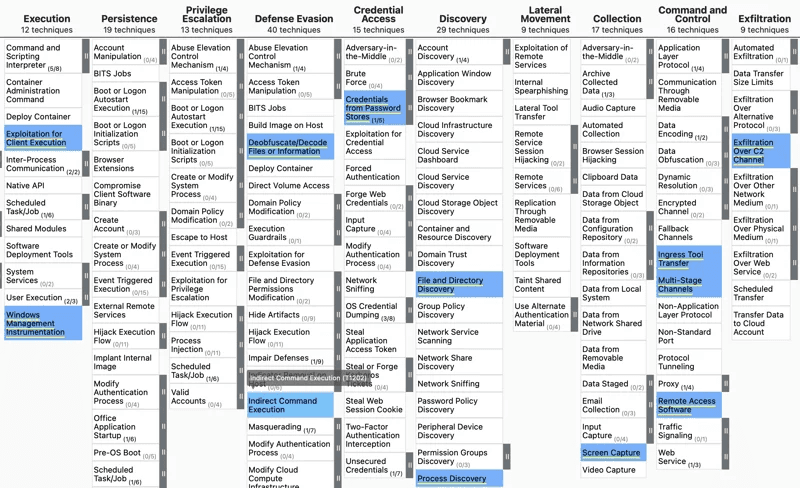
Currently, there are 129 threat groups in the ATT&CK framework. They are threat groups or individuals associated with intrusion activity and are tracked by one or more common names within the security community.
Level 2 Threat Intelligence————
Many enterprises have their own threat analyst teams, so the team can map threat intelligence to ATT&CK.
How to Map Threat Reports to ATT&CK
As shown in the image below, suppose the team discovers a blog post about an emerging malware threat; this blog post can serve as a threat intelligence resource.
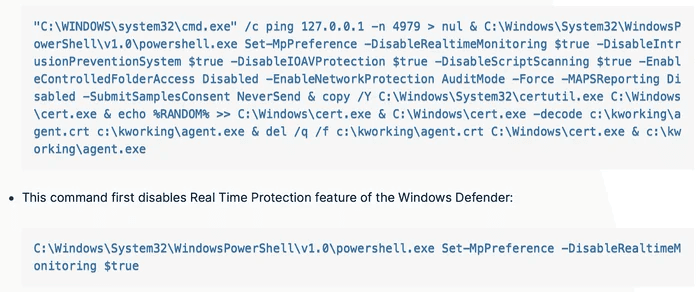
The MITRE ATT&CK team recommends the following steps to map threat intelligence sources to ATT&CK:
1. Familiarise yourself with the basics of ATT&CK: Tactics (the adversary's technical goals), Techniques (how those goals are achieved), and Procedures (how those techniques are implemented). 2. Look for adversary behaviours (TTPs) in the threat report. The TTP in the blog is "...disable Windows Defender real-time monitoring/protection features". 3. Research the adversary's behavior. If you are unfamiliar with this behavior, you may need to do more research. Some investigations for the above case show that disabling Windows Defender's real-time protection compromises the defender's effectiveness. 4. Translate the adversary's behavior into ATT&CK tactics. Enterprise ATT&CK has only 14 tactics, which are easy to match. Similar to the disabling real-time protection example, disabling security controls would fall under the Defense Evasion tactic. 5. Determine which technique applies to the behavior. This step can be somewhat difficult and can be completed by referring to examples on the ATT&CK website. Searching for "real-time monitoring" on the MITRE ATT&CK website reveals the sub-technique "T1562.001 Impair Defenses: Disable or Modify Tools". Reviewing the technique description shows that this is likely where the adversary behavior belongs.
6. The final step is to "compare your results with other analysts". Different analysts may have different perspectives, and differences can be discussed.
Level 3 Threat Intelligence————
Some organisations have more mature Cyber Threat Intelligence (CTI) teams, enabling them to map new data to ATT&CK and then use that data to prioritised defences. Map internal and external data sources to ATT&CK using the steps above, such as incident response data, subscribed threat intelligence, real-time alerts, and historical data. Based on this information, threat group information can be compared, and commonly used techniques can be prioritised.
The CTI team can combine this data to discover the most commonly used techniques, thereby prioritising strategies and helping the defensive group focus their efforts in the right places.
B. Adversary Emulation
With threat intelligence in hand, the next step is to challenge security defences against these adversary TTPs.
You can assess current defensive capabilities and how to respond to cyberattacks using the following two approaches:
Atomic Testing
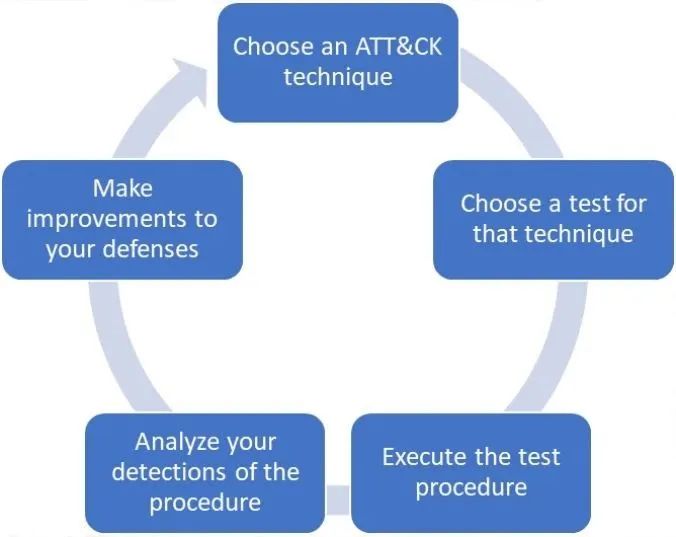
Atomic testing is testing specific security controls against specific techniques. The MITRE ATT&CK team proposes the following atomic testing cycle.
1. Select an ATT&CK technique. 2. Select a test for that technique. 3. Perform attack simulation by executing the test procedure. 4. Identify weaknesses in the defences by analysing the detection results of the defensive measures.
5. Improve defensive capabilities to remediate identified weaknesses.
After mitigation, you can return to the first step to select a new ATT&CK technique.
To create a test procedure, you can refer to the descriptions and procedure examples on the technique pages, though these references may not be specific enough to build a test procedure directly.

Attack Scenario Testing
Test multiple security controls by executing multiple adversary TTPs in sequence. This approach is more complex and requires collaboration across multiple teams. It is recommended to perform attack scenario testing through the following steps.
1. Select a threat group or malware family targeting the organisation, region, or industry. First, select the ATT&CK techniques.
2. Gather all available malware samples and threat intelligence for the selected threat group. To obtain a comprehensive overview, the CTI team needs to study threat intelligence, combining intelligence provided by MITRE ATT&CK with public intelligence. Then, identify techniques in the collected threat intelligence and analyse malware samples. 3. Analyse the adversary's behaviour to create their attack flow—namely, the adversary's attack scenario, which is a series of specific procedures leveraging the identified techniques. 4. Perform attack simulation by executing the attack scenario.
5. Identify gaps in security controls and improve defensive measures to mitigate and compensate.
▌Step 2: Validation
An effective Purple Team strategy must include validation of security controls.
Once an attack technique is simulated (atomic testing), the organisation's capability coverage for that technique can be calculated.
Once an attack scenario is simulated, the organisation's capability coverage against that threat group or malware family can be determined.
MITRE ATT&CK recommends focusing on the following gaps and measuring capability coverage:
Logging Gaps: A logging gap exists when required logs are not currently being extracted from the correct data sources.
Detection Gaps: Logs are available, but the attack technique cannot be detected based on existing analytics.
The MITRE ATT&CK Navigator tool can help visualised logging and detection coverage within the MITRE ATT&CK framework. By assigning different colours, a heat map can be built to prioritise the next mitigation steps in the process.
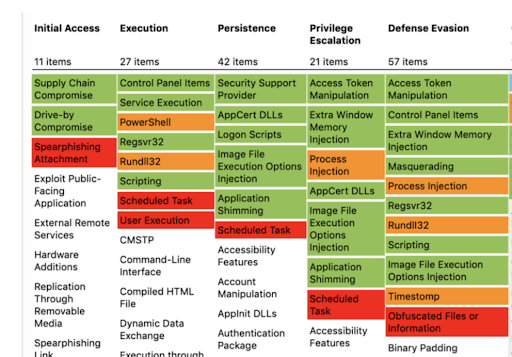
Taking the image above as an example, different colours represent different meanings:
White: The technique has not yet been tested, indicating a simulation gap.
Red: There are no corresponding logs to detect the technique, indicating a logging gap.
Orange: Logs exist, but there are no detection rules to detect the technique, indicating a detection gap.
Green: Possesses both the required logs and detection mechanisms to detect the technique, representing no gap.
▌Step 3: Mitigation
After completing simulation and validation, the identified gaps must be addressed by taking appropriate mitigation measures.
A. Assessing Gaps
If certain techniques are not simulated, it leads to assessment gaps. Therefore, suitable tools and personnel are required to simulate ATT&CK techniques.
B. Logging Gaps
Once appropriate log sources are identified through gap analysis, the organisation should start collecting these logs and ensure that the required logs are gathered, ensuring the process is not interrupted by infrastructure failures.
The MITRE ATT&CK framework provides "Data Sources" to help identify the log sources needed to detect techniques. ATT&CK defines a data source as a source of information obtained by a sensor or logging system that can be used to identify adversary activities or the results of those activities. The image below shows the data sources provided for "T1562.001 Impair Defenses: Disable or Modify Tools Sub-technique":
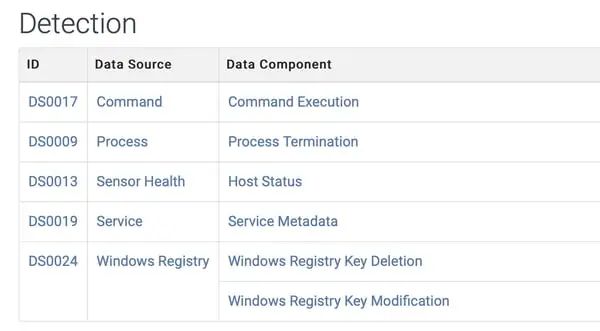
The MITRE ATT&CK framework also provides "Data Components", which bring an additional sub-layer of context to data sources and narrow down the scope of security event identification. For example, "Active Directory: Active Directory Object Access" indicates that the data source is "Active Directory" and the data component is "Directory Object Access".
C. Detection Gaps
Organisations need to develop and refine detection rules for false positives, ensuring they detect malicious behaviour as intended.
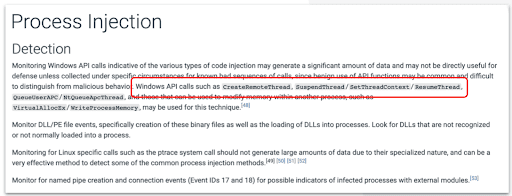
ATT&CK provides information on the details of the technique, but further research is required to determine the specific procedures used. For example, the API call names used in process injection attacks are given on the MITRE ATT&CK Process Injection page, as shown below for the DLL Injection technique.
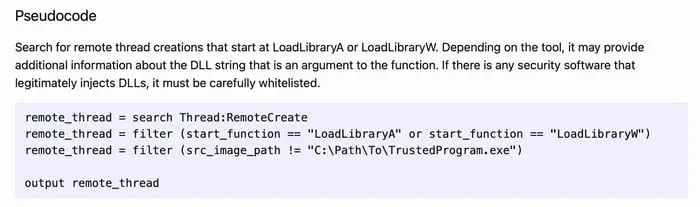
The MITRE Cyber Analytics Repository (CAR) can help develop detection rules. CAR defines data models used to generate pseudocode detection rule representations and provides implementations for specific tools like Splunk and EQL. CAR aims to provide a set of validated and well-explained analytics for the techniques covered. The example below is the pseudocode provided by MITRE CAR for detecting DLL injection through the Load Library technique.
▼
SecOps Validation Provides Comprehensive Support for Purple Teaming
SecOps Validation provides our clients with a full-process Purple Team strategy—from threat intelligence collection and analysis, attack simulation, and gap validation to providing mitigation recommendations—through the SecOps Security Metric Validation Platform.
The SecOps Validation rule library already contains 13000+ attack techniques. You can select specific tactics and techniques through the MITRE ATT&CK framework view, or select specific attack scenarios covering multiple phases and techniques of the cyber kill chain through the attack scenario view. There are currently 1600+ validation scenarios available to choose from within the platform.
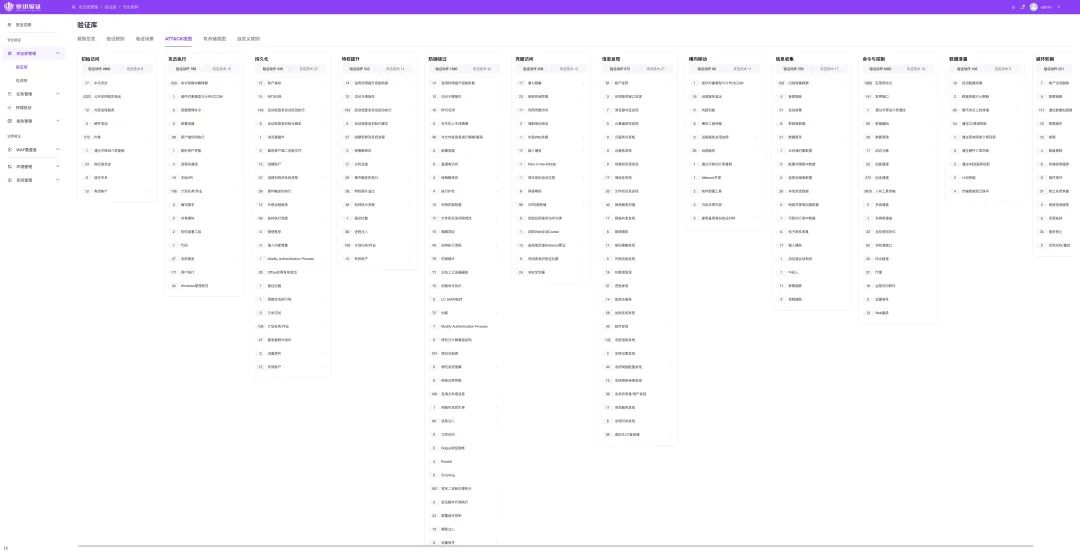
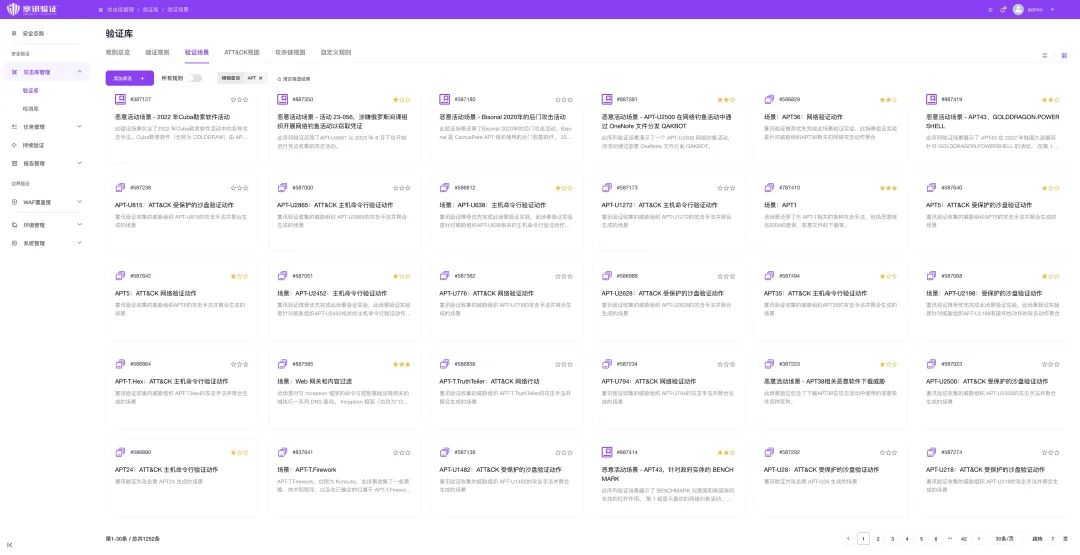
You can choose to perform continuous security validation on a daily, weekly, monthly, or yearly cycle. After each validation task is executed, you will obtain corresponding defensive capability assessment results, presented in various visual charts and quantified data. SecOps Validation also provides actionable mitigation and optimisation recommendations. After adjusting and updating, you can validate again to compare and assess the effectiveness of the optimisation measures.
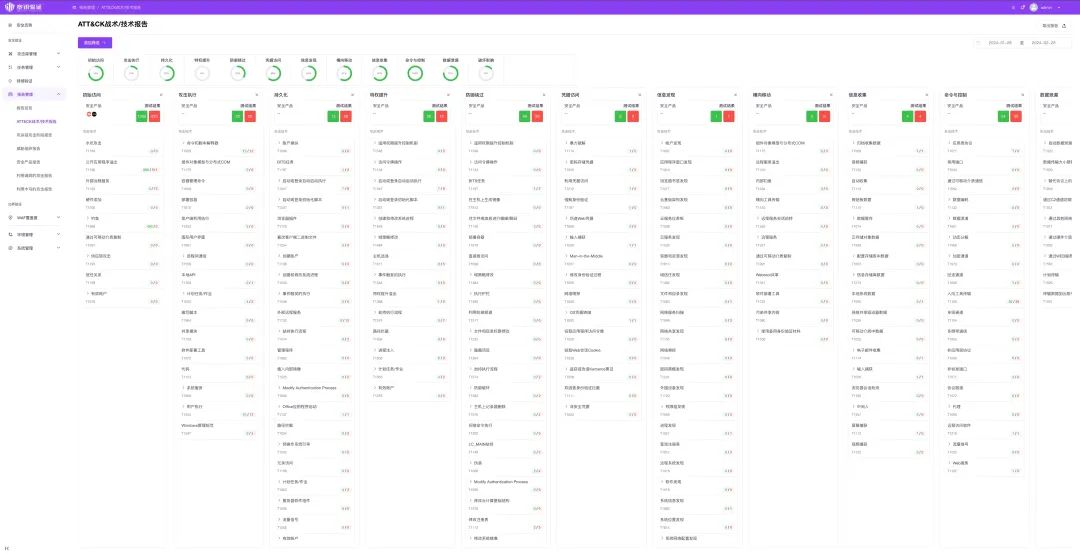
Continuous Purple Team exercises can help organisations establish and maintain optimal defensive levels in multiple "Simulation-Validation-Mitigation" cycles, enhancing the overall security posture.
Follow our official account and reply with "Purple Team" to get the original "MITRE ATT&CK User Guide".